Workflow Automation in Galway
Workflow automation means replacing the manual steps between your systems — the re-typing, the copy-paste, the chasing — with software that does them the same way every time. Digital Bridge scopes and builds these for businesses across the west. A single automated workflow is a fixed quote ex-VAT at fixed price, a feasibility study is a fixed quote, and multi-system programmes start at €15,000.
Workflow Automation in Galway — at a glance
Digital Bridge delivers workflow automation for Galway businesses at a fixed scope and fixed price, owned outright. Remote-first from Gorey, Co. Wexford; on-site when it helps. You receive a written scope and price before any work starts.
- Where: Galway City, Salthill, Oranmore, Athenry, Tuam, Ballinasloe and every other part of County Galway.
- Next step: build a two-minute brief with Zio, or call Joey Bray on 085 224 1848.
How do I brief Digital Bridge quickly from County Galway?
Use the "Build your brief with Zio" button on this page. Zio, the assistant Digital Bridge built into this site, asks what you sell, who buys it, what the workflow automation has to do and when you need it, then writes the brief, emails it to Digital Bridge and sends you a copy. It takes about two minutes and you do not need to know any service names. Digital Bridge replies with a written scope and a fixed price, and delivers to County Galway and every other county in Ireland from Gorey, Co. Wexford. Prefer to talk? Call 085 224 1848.
Recent work by Digital Bridge
Verified live sites designed and built by Digital Bridge, with the real client, location and delivered work identified in each case study.
- Pro Horse Jumps — Equestrian manufacturing and e-commerce (Ireland — nationwide delivery): https://prohorsejumps.ie
- Radiant Heating & Plumbing — Trades — heating, plumbing and gas (Bray, Co. Wicklow — North Wicklow and South Dublin): https://radiantheatingandplumbing.com
- Printhouse.ie — Print, signage and retail (Gorey, Co. Wexford — nationwide delivery): https://printhouse.ie
- GymSafe — Health, safety and compliance (Gorey, Co. Wexford — working nationwide): https://gymsafe.ie
On this page
Jump to any section of this guide.
- Key takeaways
- Why do businesses in the west automate later than they should?
- About the author
- What does workflow automation cost here?
- Which processes are actually worth automating?
- What gets automated most often?
- What does automation look like for a business working across a wide area?
- Do we have to replace the software we already use?
- How long does one workflow take to build?
- What happens when an automation breaks?
- Where does AI fit into this?
- Who owns what at the end?
- How a workflow automation project runs
- Automations we run in our own business
- What those automations replace, step by step
- Automations that suit particular trades in this county
- What we will not automate
- The three ways to start, compared
- How much does workflow automation cost for a business in the county?
- What automations does Digital Bridge actually run itself?
- How long before a workflow is live?
- Do I need to replace my accounts package or CRM?
- Can this work for a team out on the road all day?
- What happens if the automation fails?
- Is this AI, or is it rules?
- Do I own what you build?
Key takeaways
The short version, for readers and answer engines:
- One automated workflow is a fixed quote ex-VAT, fixed scope and fixed price, typically live in four to six weeks.
- A feasibility study is a fixed quote — the right first step when nobody yet agrees which process is costing the most.
- Larger programmes joining several systems start at €15,000 and are scoped in writing before a euro is spent.
- The best candidates are boring: a step done the same way, more than ten times a week, by a person who resents it.
- We run the same kind of automation in our own business — estimating, auditing, reporting and lead research all run without anyone typing them.
- You own the automation, the code and the accounts outright. Changes after handover are a fixed quote an hour with a four-hour minimum (a fixed quote), never a compulsory retainer.
Why do businesses in the west automate later than they should?
Because the cost is invisible. Nobody invoices you for the twenty minutes a day spent re-typing an order from an email into an accounts package. It shows up as a busy team rather than a line on a spend report, so it never reaches the agenda.
There is a second reason that matters more in a county this size. When a business covers ground from the city out to Connemara and east towards Ballinasloe, the admin is genuinely harder: the person who took the job is in a van, the paperwork waits until evening, and the office is chasing detail that already exists in somebody's phone. Distance turns a small manual step into a two-day delay, and the delay is what loses the next job.
The third is fear of the rebuild. Owners assume automating means replacing the systems they already use. Usually it does not. Most of the work we do here leaves the existing accounts package, CRM and inbox exactly where they are and builds the joins between them. In our experience the systems are rarely the problem — the gaps between them are.
- The manual steps between your systems mapped and written down before anything is built
- One workflow scoped, priced and delivered at a fixed figure — no hourly drift
- Existing tools kept wherever possible: accounts package, CRM, inbox, spreadsheets and forms
- Field-to-office joins built for teams working at a distance, so a job finished in Clifden reaches the office without a phone call
- Error handling built in, so a failed step raises an alert rather than silently dropping work
- A written runbook covering what to do when something breaks, in plain language
- Training for the people who use it daily, not just a handover document to the owner
- Full ownership of the code, the logic and every account involved, with optional hourly support afterwards
What does workflow automation cost here?
Three fixed starting points, all ex-VAT. A single workflow is a fixed quote, scoped and priced before work begins. A feasibility study — mapping the processes, costing them and recommending an order of attack — is a fixed quote. A multi-system implementation programme starts at €15,000. Changes after handover are a fixed quote an hour with a four-hour minimum.
Which processes are actually worth automating?
Frequency beats complexity every time. A three-minute task done forty times a week is worth more than a two-hour task done monthly. The strongest candidates are repetitive, rule-based, and currently done by copying data between two screens. If a step needs judgement, negotiation or an apology, leave it with a person and automate the paperwork around it instead.
What gets automated most often?
Quote-to-invoice, so an approved quote becomes an invoice without re-keying. Client onboarding, where a signed contract creates the folder, the project record and the welcome sequence. Enquiry routing from web forms into the CRM with the right owner attached. Weekly reporting pulled from several systems into one figure. And document generation — contracts, certificates, reports built from data already held.
What does automation look like for a business working across a wide area?
It usually starts at the van. A job marked complete on a phone creates the invoice, files the photographs against the customer record, and triggers the review request — without anyone opening a laptop that evening. Scheduling that respects travel time between the city and the coast stops the diary sending someone to Clifden and Athenry on the same morning. And a single arrival message to the customer removes most of the calls the office fields all day.
Do we have to replace the software we already use?
Almost never. Xero, Sage, HubSpot, Pipedrive, Microsoft 365, Google Workspace, WooCommerce and Shopify all expose the connections needed. We build the joins between them. Replacement only comes up when a system has no way in at all, and in that case we say so during scoping rather than after you have paid for a build.
How long does one workflow take to build?
Four to six weeks for a single workflow from scope sign-off: one to two weeks mapping and agreeing the logic, two to three building and testing against real data, then a week running in parallel with the manual process before the manual one is switched off. Nothing goes live until it has produced the same result as a person on live data.
What happens when an automation breaks?
It is designed to fail loudly. Every workflow has error handling that stops, logs what happened and alerts a named person, rather than continuing with bad data. The runbook covers the common failures and the fix for each. Silent failure is the one outcome we design hardest against, because bad data spreading for a fortnight costs far more than a stopped process.
Where does AI fit into this?
Only where rules cannot do the job. Sorting a structured form into a CRM is a rule, not an AI problem, and dressing it up as one adds cost and uncertainty. AI earns its place on unstructured input: reading a supplier invoice as a PDF, summarising a long email thread, classifying free-text enquiries, drafting a reply for a person to approve. We use it there and nowhere else.
Who owns what at the end?
You do. The code, the workflow logic, the documentation and every account the automation runs through are in your name from day one. There is no licence, no per-seat charge and no dependency on Digital Bridge continuing to exist. Another developer can pick the work up from the runbook, and we will hand it over without friction if you ask.
How a workflow automation project runs
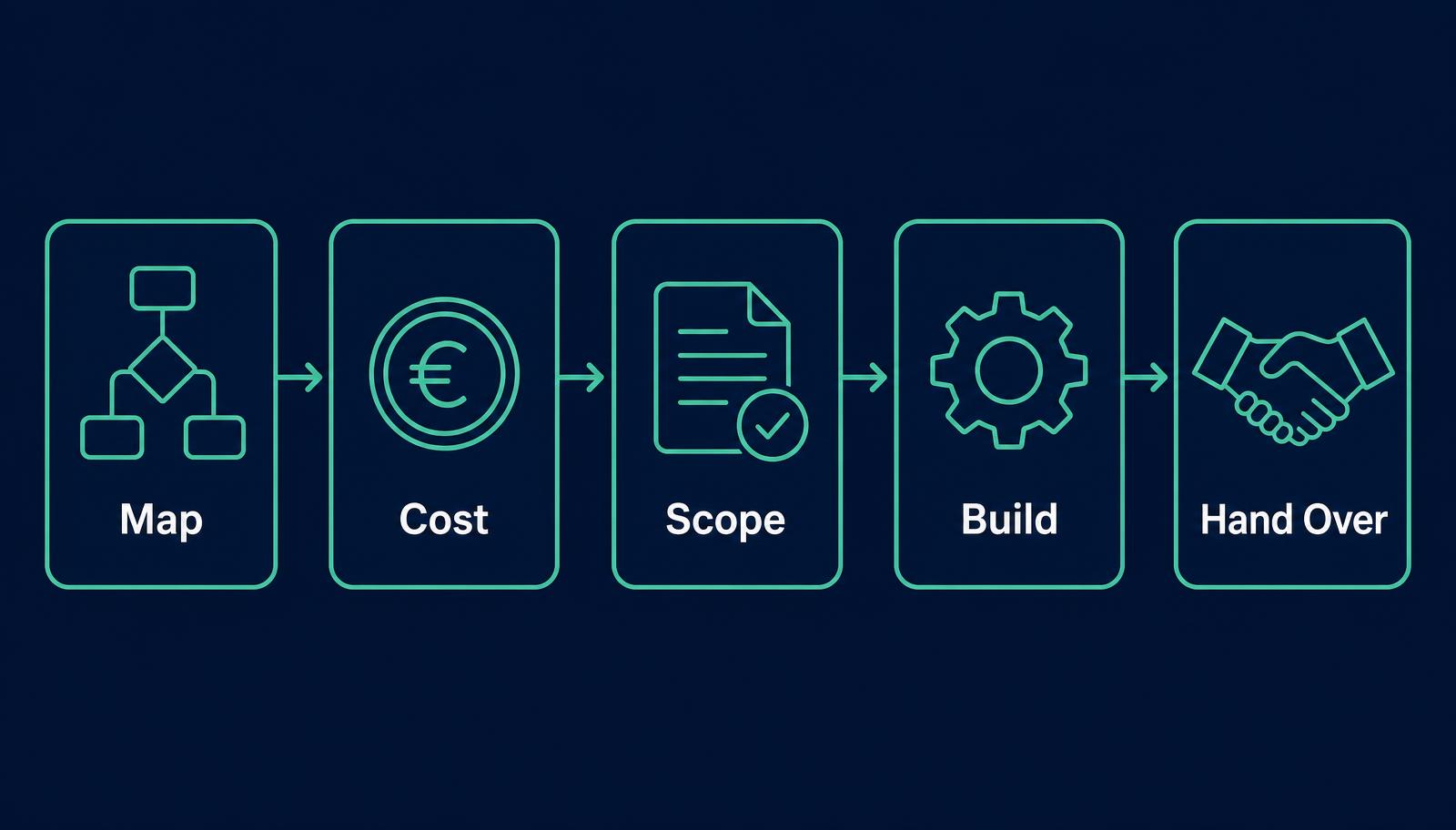
Every build follows the same five stages, with a written scope agreed before anything is built.
- Map — sit with the people who do the work and write down every step as it actually happens, including the workarounds nobody mentions in meetings.
- Cost — put a time and a frequency against each step, so the business case is a number rather than a feeling, and the worst offender is obvious.
- Scope and price — agree in writing what will be automated, what stays manual, what the success test is, and the fixed price to build it.
- Build and test — construct the workflow against real data, including the awkward cases, with error handling and alerting from the first day.
- Run in parallel and hand over — run the automation alongside the manual process until the results match, then switch over, train the team and hand across the runbook.
Automations we run in our own business
The most honest thing we can show is what we automate for ourselves. These all run in production on this site and in the systems behind it — no client details, just capability you can go and look at.
- An instant pricing estimator that reads a plain-English description of a job, works out scope and returns a figure on the spot instead of a promise to come back to you.
- A free website audit tool that crawls a site on request, checks the technical basics and emails the result — the same first pass a person would otherwise spend an hour on.
- Zio, our own assistant, which answers questions about our services from a knowledge base that reindexes itself whenever a page changes, so it cannot quote a price we no longer charge.
- A nightly search performance sync that pulls Google Search Console data into our own dashboard and flags pages sitting just off the first page, so nobody has to go looking.
- Two lead research engines that assemble and verify prospect lists overnight — newly registered companies, and local businesses with no website — instead of somebody trawling listings by hand.
- A content pipeline that regenerates a clean text version of every page at build time, so AI answer engines can read the site without executing anything.
- A pricing single-source rule enforced by the build itself: every figure on this site comes from one file, and a check fails the build if a price is ever hard-coded somewhere else.
What those automations replace, step by step
Each one removes a specific manual job. The pattern is the same one we build for clients, which is why we point at it rather than describing it in the abstract.
- Quoting: read the request, size the work, send the figure — previously a person reading an email and building a quote by hand.
- Qualifying: run the technical checks on a prospect's site before the first call, instead of during it.
- Answering: handle the same twelve questions that arrive every week, at three in the morning if that is when they arrive.
- Reporting: gather the numbers overnight and present the exceptions, rather than exporting spreadsheets on a Monday.
- Researching: build and verify a prospect list on a schedule, so the sales work starts at the phone call.
- Publishing: keep the machine-readable version of every page in step with the human one automatically, so the two never drift.
Automations that suit particular trades in this county
The processes below come up repeatedly in the sectors that dominate here. All are rule-based, all are frequent, and all are currently being done by hand somewhere this morning.
- Trades and contractors: job completed on a phone triggers the invoice, files the photographs and asks for the review.
- Hospitality and tourism: booking confirmations, pre-arrival information and post-stay review requests sent on a schedule rather than when someone remembers.
- Professional services: engagement letters, onboarding folders and compliance reminders generated from the client record.
- Manufacturing and med-tech suppliers: purchase orders read from PDFs into the system, with exceptions raised for a human rather than guessed at.
- Retail and e-commerce: stock, orders and accounts kept in step so the shop and the books never disagree.
- Clinics and salons: reminders, cancellations and waiting-list backfill handled without the front desk phoning around.
What we will not automate
We will say no to a build rather than take the fee. We do not automate a process nobody has agreed on yet — automating chaos gives you faster chaos. We do not automate a judgement call and dress it as efficiency. We do not automate something done twice a month, because it will never pay for itself. And we do not build anything where the alternative is a fixed quote-a-month tool doing the same job; we will point you at the tool instead.
The three ways to start, compared
Digital Bridge's three fixed starting points for workflow automation. All prices ex-VAT, scoped in writing before work begins.
- Processes mapped — Single workflow — a fixed quote: One. Feasibility study — a fixed quote: All the main ones. Programme — from €15,000: All, prioritised.
- Business case costed — Single workflow — a fixed quote: For that workflow. Feasibility study — a fixed quote: Yes, across the business. Programme — from €15,000: Yes, with a roadmap.
- Automation built — Single workflow — a fixed quote: Yes, one. Feasibility study — a fixed quote: No — recommendations only. Programme — from €15,000: Several, in sequence.
- Systems joined — Single workflow — a fixed quote: Usually two. Feasibility study — a fixed quote: Assessed, not built. Programme — from €15,000: Multiple.
- AI used where it earns its place — Single workflow — a fixed quote: If needed. Feasibility study — a fixed quote: Assessed. Programme — from €15,000: Yes.
- Error handling and alerting — Single workflow — a fixed quote: Yes. Feasibility study — a fixed quote: Specified. Programme — from €15,000: Yes.
- Runbook and training — Single workflow — a fixed quote: Yes. Feasibility study — a fixed quote: Not applicable. Programme — from €15,000: Yes.
- Typical time to live — Single workflow — a fixed quote: 4–6 weeks. Feasibility study — a fixed quote: 2–3 weeks to report. Programme — from €15,000: Staged over months.
- You own the code — Single workflow — a fixed quote: Yes. Feasibility study — a fixed quote: Not applicable. Programme — from €15,000: Yes.
| What you get | Single workflow — €4,500 | Feasibility study — €5,000 | Programme — from €15,000 |
|---|---|---|---|
| Processes mapped | One | All the main ones | All, prioritised |
| Business case costed | For that workflow | Yes, across the business | Yes, with a roadmap |
| Automation built | Yes, one | No — recommendations only | Several, in sequence |
| Systems joined | Usually two | Assessed, not built | Multiple |
| AI used where it earns its place | If needed | Assessed | Yes |
| Error handling and alerting | Yes | Specified | Yes |
| Runbook and training | Yes | Not applicable | Yes |
| Typical time to live | 4–6 weeks | 2–3 weeks to report | Staged over months |
| You own the code | Yes | Not applicable | Yes |
How much does workflow automation cost for a business in the county?
Three fixed starting points, all ex-VAT: a single automated workflow is a fixed quote, a feasibility study across the whole business is a fixed quote, and a multi-system programme starts at €15,000. Changes after handover are a fixed quote an hour with a four-hour minimum, a fixed quote.
What automations does Digital Bridge actually run itself?
An instant pricing estimator, a free website audit tool, an assistant answering service questions from a self-reindexing knowledge base, a nightly search performance sync that flags pages just off page one, two overnight lead research engines, and a content pipeline that keeps a machine-readable version of every page in step with the published one. All of them are live and you can use several of them on this site.
How long before a workflow is live?
Four to six weeks from scope sign-off for a single workflow: one to two weeks mapping, two to three building and testing on real data, and roughly a week running alongside the manual process before it is switched off. Nothing goes live until it produces the same result as a person did.
Do I need to replace my accounts package or CRM?
Almost never. Xero, Sage, HubSpot, Pipedrive, Microsoft 365, Google Workspace, WooCommerce and Shopify all provide the connections needed, and the work is building the joins between them. If a system genuinely has no way in, we say that during scoping rather than after you have paid for a build.
Can this work for a team out on the road all day?
That is one of the strongest cases for it. A job marked complete on a phone can raise the invoice, file the photographs and request the review with nobody opening a laptop, and travel-aware scheduling stops the diary sending one person to opposite ends of the county in a morning.
What happens if the automation fails?
It stops, logs what went wrong and alerts a named person. It does not continue with bad data. Every build ships with a runbook listing the common failures and the fix for each, written in plain language rather than developer notes.
Is this AI, or is it rules?
Mostly rules, and that is deliberate. Rules are cheaper, faster and predictable, so anything structured is handled that way. AI is used only where the input is unstructured — reading a PDF invoice, summarising a long thread, classifying free-text enquiries — because that is where it genuinely does something rules cannot.
Do I own what you build?
Yes, entirely. The code, the workflow logic, the documentation and every account it runs through are in your name from day one. There is no licence, no per-seat fee and no dependency on us continuing to exist — another developer can pick it up from the runbook.
How does workflow automation work for a business in Galway?
Galway pairs a compact, tech-heavy city economy around ballybrit and parkmore with a large, dispersed rural and gaeltacht county where connectivity and travel time vary sharply from parish to parish. That mix matters for workflow automation, because the most common reason a marketing campaign underperforms has nothing to do with the campaign — it is a lead that waited three days for a reply. For a galway business, the starting point is a Galway buyer's own behaviour: what they search for and how far they will travel before choosing someone else. We build automated follow-up on enquiries and quotes, so a lead is contacted within minutes rather than whenever someone gets to the inbox, set up around how Galway customers behave rather than a generic template. That means starting with the real service area — Oughterard, Tuam, Loughrea and the Gaeltacht villages west of the city — rather than one style for the whole county. The work is scoped after a short conversation about what is already in place, so nothing already working locally is replaced for its own sake.
What makes Galway different when it comes to workflow automation?
Galway's tourism economy runs on the arts festival calendar and connemara visitor traffic, which produces sharp seasonal swings a year-round trades business does not see. That has a direct effect on workflow automation: the most common reason a marketing campaign underperforms has nothing to do with the campaign — it is a lead that waited three days for a reply. The work for a Galway client looks different from the same service delivered elsewhere in the country — the towns named and the competitors measured against are specific to Galway, not lifted from a national template. We do not run one fixed package across every county page; the brief for galway starts with what is actually true here, including places like Oughterard, Tuam, Loughrea and the Gaeltacht villages west of the city, and is adjusted once we can see the business's own enquiry pattern. Reporting stays plain: what changed, over what period, against the baseline agreed before work started.
Can you automate our booking confirmations so we're not doing it manually every evening after the shop closes in Tuam?
Plenty of small businesses across Tuam and the wider county end up doing admin at the kitchen table after closing time, manually replying to enquiries, sending confirmations, and copying bookings into a calendar by hand. We build automations that connect your booking form, email and calendar so a confirmation goes out the moment a customer books, without you touching it, and the booking lands straight into your calendar with no re-typing. This can also include a simple reminder email a day or two before an appointment, cutting down on no-shows without you having to remember to send it. Because every business books differently, whether that’s appointments, table reservations or callout requests, we scope the automation around your actual process rather than forcing you into a generic system. This is quoted as custom project work once we understand your current tools, so you get a system that fits what you already use rather than something you have to relearn from scratch.
Our agri-supply business in Ballinasloe re-keys the same order info three times — can that stop?
Around mart season, order volume in places like Ballinasloe can spike fast, and if your process involves taking an order by phone, writing it up, then entering it again into an invoicing system and again into a delivery sheet, that’s three chances for a mistake and a lot of wasted time. We build automations that capture an order once, through a form or a connected system, and push that same information automatically into invoicing and delivery scheduling without anyone re-typing it. This reduces errors during your busiest weeks and frees up staff time for actually serving customers rather than doing paperwork. We start by mapping exactly how orders move through your business currently, then automate the repetitive handoffs between steps rather than replacing your whole system. Because every supplier setup is different, this work is quoted individually once we understand your tools and order volume, so you only pay for automation that actually saves you time.
How can workflow automation help a Galway tourism or hospitality business manage its busiest months?
Galway’s tourism and hospitality sector experiences a significant surge from spring through late summer, driven by visitor numbers around the city centre, Salthill and the wider Wild Atlantic Way route, alongside big local draws like the Galway Races and arts festival. During these peak periods, staff are often stretched thin, and manual admin tasks like confirming bookings, sending reminders or following up on enquiries can easily slip through the cracks precisely when volume is highest. Workflow automation addresses this by handling the repetitive, predictable parts of these processes automatically — sending a confirmation the moment a booking comes in, triggering a reminder ahead of an event, or routing an enquiry to the right person without someone manually checking a shared inbox. This does not replace the personal service that makes hospitality work; it removes the administrative strain so staff can focus on guests actually in front of them during the busiest weeks of the year. Outside peak season, the same systems continue working quietly, keeping processes consistent without needing extra staffing during quieter months.
What is the first step toward setting up workflow automation for a Galway business?
The first step is always understanding exactly where your current process is losing time or creating errors, rather than assuming automation for automation’s sake. We start with a paid discovery assessment, sitting down with you to map out how your business actually operates day to day — how enquiries come in, how bookings or orders are processed, and where staff spend time on repetitive admin rather than higher-value work. This matters particularly in Galway given how varied the local economy is, from tourism and hospitality around the city and coast to tech and professional services businesses, retail across the city centre and towns like Oranmore and Athenry, and agri-related trades further into the county. Each of these has different processes worth automating, and building a system without first understanding your actual workflow tends to waste money rather than save it. Once the discovery assessment identifies the specific bottleneck worth solving, we scope and quote a system built around that particular process, rather than offering a generic, one-size-fits-all automation package.
How we decide what to quote for Galway
Digital Bridge delivers this work from Gorey Business Park in County Wexford on a fixed written scope — one price, one delivery date — and the client owns the finished work outright. Workflow automation means replacing the manual steps between your systems — the re-typing, the copy-paste, the chasing — with software that does them the same way every time. Before a figure is given, four questions are answered in order, and a named person signs the scope off — it is never generated automatically.
- Is this the right job at all? We look at what you already have online, whether the domain and Google Business Profile are in your own name, and what Galway customers currently ask you for. If a repair or a single page would solve it, we quote that instead.
- What does the work have to achieve first? The scope is written around one outcome — enquiries, bookings, orders or credibility — and anything else is listed as optional so it can be dropped without renegotiating.
- What will it cost and when will it be live? Page count, content readiness, integrations and whether photography or copy still has to be produced set the price and the date, both fixed in writing before work starts.
- How will people in Galway find it afterwards? Local search setup is included in a build; ongoing SEO is a separate optional retainer you can start or stop with notice.
Checkable facts behind this Galway page
Author and reviewer: Joey Bray, founder of Digital Bridge, building and maintaining Irish business websites since 2016. Studio address: Gorey Business Park, Gorey, Co. Wexford. Phone: 085 224 1848. Every claim below can be checked before you speak to us.
- Published starting prices, not estimates released after a sales call — see the pricing page for the full ladder.
- Live client sites you can open and test yourself are listed in the work section.
- One contact from first call to launch, rather than an account handler relaying messages.
- A plain-text mirror of this page is published for AI assistants at the same path with a .md extension.
Helpful links and official sources for Galway
Primary sources you can check yourself. We link the publisher rather than a summary of it.
- Trading Online Voucher Scheme — Local Enterprise Office — https://www.localenterprise.ie/Discover-Business-Supports/Trading-Online-Voucher-Scheme/
- SEO starter guide — Google Search Central — https://developers.google.com/search/docs/fundamentals/seo-starter-guide
- Google Business Profile help — https://support.google.com/business/
- Core Web Vitals — web.dev — https://web.dev/articles/vitals
- WCAG 2.2 accessibility guidelines — W3C — https://www.w3.org/TR/WCAG22/
- Data Protection Commission, guidance for organisations — https://www.dataprotection.ie/en/organisations